
When a publisher asks, “What are Bible tabs?”, the answer is page-edge markers that help readers find Bible books or planned sections quickly. The term usually describes peel-and-stick labels that fold over the page edge, but it can also refer to an integrated thumb index made by cutting notches into the edges of selected pages.
That difference matters when you are planning a Bible for publication, ministry distribution, retail, or a gift program. Adhesive tabs can be added after printing and offer flexible labeling. A printed thumb index becomes part of the book block and requires layout, cutting, and quality checks before bulk production. This guide explains how the two options work, where each fits, and what to include in a production brief.
What Are Bible Tabs?
Bible tabs are physical markers that identify Bible books or other reference sections at the page edge. A reader can see or feel the marker and turn directly to the approximate location instead of searching through the text block.
The phrase usually points to two production choices:
- Adhesive index tabs: Pre-cut labels with a printed book or section name. The user, a binder, or a finishing team places the tab on one page and folds it over the edge.
- Printed thumb indexes: Semi-circular or other shaped cuts in the edges of selected pages. The exposed page edge carries the printed label, creating an integrated index.
| Option | Physical construction | Best planning question |
|---|---|---|
| Adhesive tab | Separate printed label with adhesive, folded over a page edge | Who applies it, and can the selected page withstand repeated handling? |
| Printed thumb index | Notch cut into the book block, with a label printed or applied at the exposed edge | Can the layout, paper, trimming, and finishing process hold the notch sequence accurately? |
| Personal or decorative tab | User-selected marker for a topic or note | Is the marker part of the product specification or added after sale? |
The label set also needs a decision. An edition may identify biblical books, reference sections, or additional books, so define the books, sections, language, and label treatment in the brief. Kingtai’s custom Bible printing and Scripture publishing solutions pages provide context for matching format to use and audience.
How Do Adhesive Bible Tabs Work?
Adhesive Bible tabs work by attaching a printed, fold-over label to the edge of a selected page. Commercial sets commonly arrive pre-cut and self-adhesive, although a publisher can specify a custom printed set or have tabs applied as a finishing step.
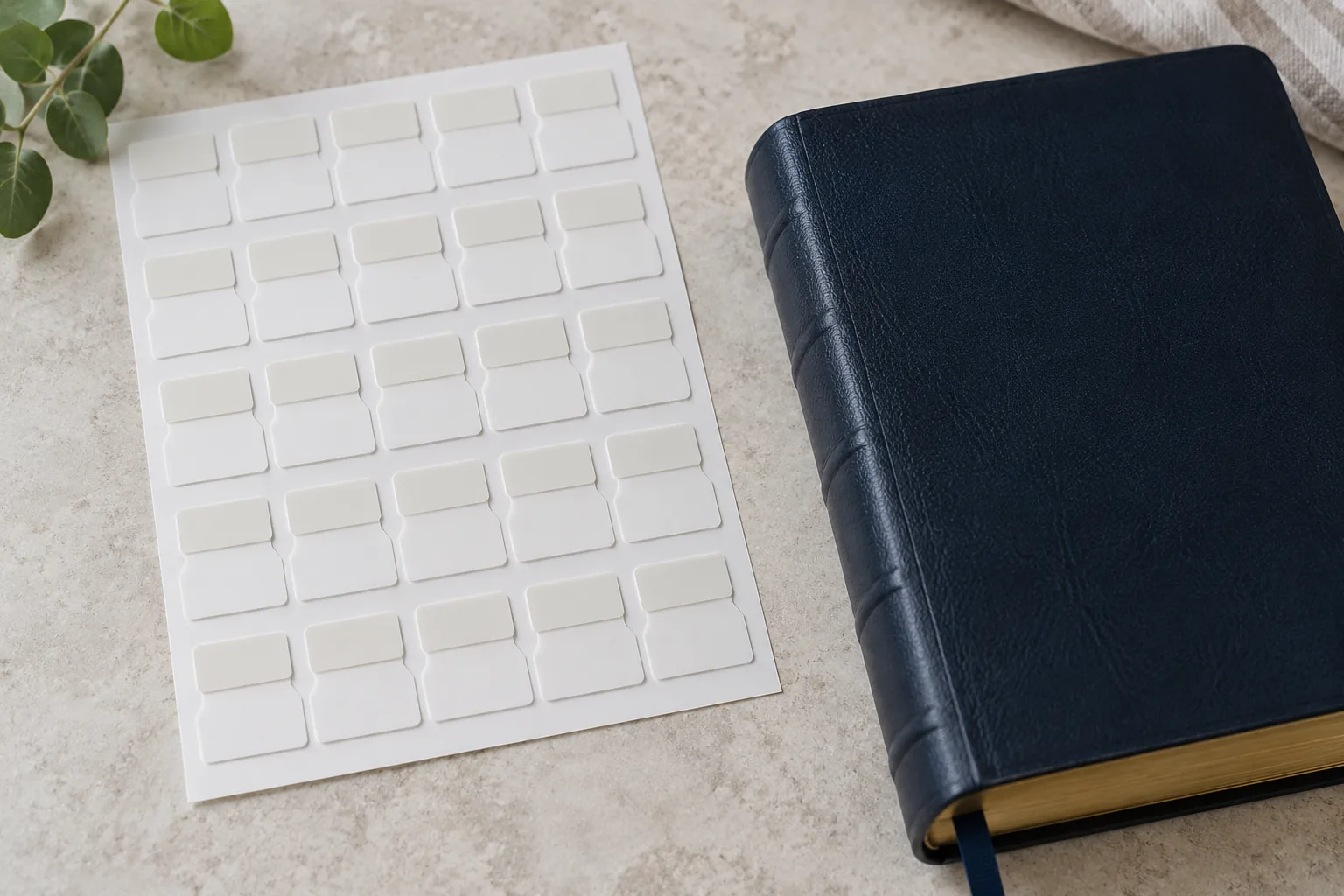
Application is straightforward, but thin Bible paper leaves little room for a careless placement. The person applying the tabs must identify the correct page, lift a single sheet, align the label, and press the two halves together. A positioning guide can keep the sequence readable when the book is closed.
This option is flexible because the labels can be applied to an existing Bible or added as an optional pack. The trade-off is labor and handling. Someone must check the sequence, keep labels aligned, and avoid stressing the page.
For a custom edition, confirm whether the tabs are:
- supplied loose for the customer or end user;
- applied by the factory during finishing;
- printed on one side or both sides; and
- intended for one language or several versions, and for Bible books only or additional sections.
Adhesive tabs are a practical choice when the label set may change, when a project needs an add-on accessory, or when the edition is already printed. They still need a physical sample. Test the adhesive area, fold position, page edge, label visibility, and the effect of repeated opening before approving the final set.
How Are Printed Thumb Indexes Made?
Printed thumb indexes are made by planning labels and cut-in notches as one feature of the book block. A notch removes a curved or otherwise defined section from the page edge, while staggered positions identify different books or sections. The reader places a thumb in the opening and turns to the exposed label.
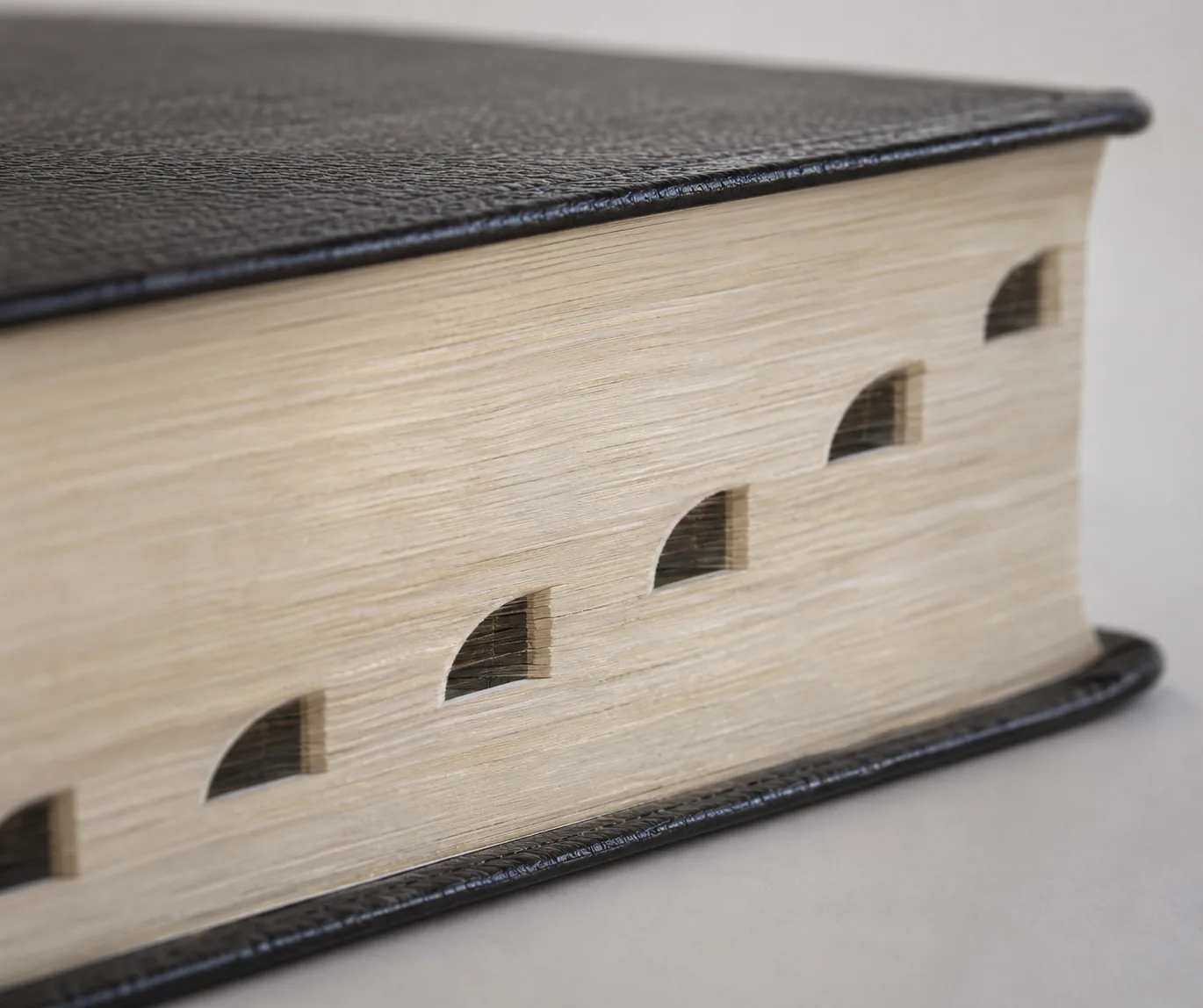
The feature begins in prepress. The layout team must know which page starts each section and where the label will appear. The printer then needs a cutting plan that matches the page sequence, trim, paper, and binding. A die-cut or specialized notch-cutting operation is used on the sheets or book block, depending on the setup. A published thumb-index patent shows one cut-in approach; it is not a universal production specification.
The index is integrated, so it cannot be moved after the page plan is locked without changing the physical book. The sample should show that each cut reaches the intended section, the label remains legible, and the notches form a clean cascade.
The feature also needs a quality-control check. Reviewers should compare the cut location with the first page of each indexed book, inspect the edge for rough or crushed paper, and open the book from several notches. This is part of a broader file-to-sample workflow described in Kingtai’s custom printing services. A printer should confirm the actual method, file marks, and approval points rather than assuming that a generic index-tab template fits every Bible.
Which Option Fits a Custom Bible?
Neither method fits every edition. The choice depends on flexible application versus an integrated feature, and on how the book will be used.

| Decision factor | Adhesive tabs | Printed thumb index |
|---|---|---|
| When it can be added | After printing or during finishing | During the planned manufacturing sequence |
| Label flexibility | Can be customized or supplied separately before application; later removal depends on the adhesive and paper | Must follow the approved page and label plan |
| Physical result | A separate marker extends beyond the page edge | The page edge itself forms the marker |
| Personalization | Useful for custom topics, notes, or optional sets | Best for a stable, edition-wide navigation system |
| Main production risk | Misplacement, adhesive failure, or page stress | Wrong notch location, rough cuts, or misaligned labels |
| Buyer review | Check single-page application and repeated tab use | Check the full index sequence and cut quality in a bound sample |
Choose adhesive tabs when the edition needs flexibility, an optional accessory, or a post-production solution. Choose a printed thumb index when navigation is part of the permanent design and the team can control the layout and cutting sequence.
The decision can also be mixed. A Bible may use an integrated index for its standard book sequence and include adhesive tabs for maps, study tools, or personal markers. If you combine methods, list each feature separately so the sample review does not treat one as a substitute for the other.
What Do Paper and Page Edges Change?
Bible paper affects how tabs are applied, how the edge behaves, and how comfortably the finished book opens. Thin paper can keep a large text block manageable, but it also demands careful handling and clear expectations for opacity, print clarity, folding, and edge strength.

With adhesive tabs, the page receives a folded label and repeated finger contact. Pulling upward can stress a delicate sheet. With a thumb index, the edge is cut, so the notch and surrounding paper must withstand normal opening and closing. Indexing can increase page-edge wear, especially if a notch catches during repeated use. Test the feature instead of treating that trade-off as an automatic rejection.
Review these points in a sample:
- Can the reader distinguish the label from text showing through the thin sheet?
- Does the page remain flat enough for the adhesive to bond without a crease?
- Does the cut edge stay clean after repeated opening, and does the paper gather and bind without shifting the index?
- Does the edge feel comfortable in the reader’s hand?
Kingtai’s Bible paper guide explains why opacity, page feel, bulk, and binding should be considered together. For a tab project, add edge handling and index visibility to that review. Paper should be approved as part of the finished system rather than as an isolated GSM line.
How Do Trim Size and Layout Affect Index Placement?
Trim size and page layout determine how much vertical space is available for tabs, where labels sit, and whether readers can distinguish adjacent markers. A tab plan that works on a tall personal Bible may become crowded on a compact edition.
Before the printer prepares a final file, lock:
- finished trim size and page height;
- the sequence of indexed books or sections;
- language, spelling, capitalization, and label length;
- which page begins each marker;
- whether labels are printed on the exposed page edge or on a separate applied marker;
- how maps, concordances, study notes, or other inserts affect the sequence; and
- how the index relates to the cover, spine, and page-edge finish.
The sequence must follow the approved content. If an introduction, color insert, or revised front matter changes pagination, regenerate the index map. Long labels may require different type or a larger marker area, so settle these layout decisions before production.
Kingtai’s Bible dimensions guide is a useful related reference for considering trim size, page count, typography, and physical handling. A tab specification should add the exact page height and section map that the printer will use for the sample.
How Do Binding and Cover Choices Interact With Tabs?
Binding and cover choices affect how a tabbed Bible opens, closes, and protects its page edges. Evaluate the index with the actual text-block bulk and cover construction, because a loose tab or exposed notch behaves differently in flexible and rigid covers.
Ask the production team to review:
- whether the book opens far enough for the reader to use each marker comfortably;
- whether the inner edge or spine pressure makes the indexed section hard to reach;
- whether the cover protects the protruding adhesive tabs or cut edge during handling and packing;
- whether the cover material and finish create extra friction against the page edge; and
- whether the finished spine and cover dimensions still match the approved page block.
A premium cover does not remove the need for a tab test. It can change how the book is carried, shelved, and opened. Kingtai’s custom Bible cover material guide frames cover decisions around use, feel, and durability. Check the tab feature on the bound sample.
What Should a Bible-Tab RFQ Include?
A useful Bible-tab RFQ states the feature in production terms. “Bible with tabs” is too broad for comparison because it leaves the method, label scope, and application responsibility open.
| RFQ field | What to state | Why it affects the quote or sample |
|---|---|---|
| Index method | Adhesive, printed thumb index, or a combination | Defines the production and finishing path |
| Label scope | Books, reference sections, language, and exact names | Prevents missing or incorrect markers |
| File and pagination | Trim size, page height, page-start map, and revision status | Connects labels and cuts to the approved content |
| Material and binding | Text paper, cover, binding, and edge treatment | Determines handling and page-edge behavior |
| Application responsibility | Factory, customer, distributor, or end user | Separates finishing work from accessory supply |
| Sample checks | Visibility, alignment, edge quality, opening, and repeat use | Defines what approval must prove |
Also state the intended use. A church distribution edition, study reference, retail Bible, and commemorative product can have different priorities for cost, handling, presentation, and optional personalization. Include the quantity range and packing expectations, but do not treat an early estimate as a final physical specification.
If the brief is still developing, contact Kingtai with the edition type, approximate quantity, trim size, page plan, preferred index method, and the questions the sample must answer. A clear starting brief makes the next production conversation more useful.
How Should Buyers Test Tabs Before Bulk Production?
Buyers should approve a tabbed Bible through file, physical, and use checks. A single attractive spread cannot prove that the full index sequence works.

- Check the file map and sample. Confirm that labels point to the intended pages and that the included books or sections match the approved edition. For adhesive tabs, check the bond, fold line, print, and page selection. For a thumb index, check notch shape, cut cleanliness, depth, and label alignment.
- Use the book as a reader would. Open several early, middle, and late markers. Turn pages with one hand, close the book, and repeat the action. Look for tabs that catch, peel, lift, or obscure text.
- Check the difficult pages. Review thin-paper areas, dense notes, maps or inserts, the first and last indexed sections, and long or translated labels.
- Record approval details. Keep the approved label artwork, page map, paper and binding direction, cover sample, and agreed inspection points with the production file.
- Compare bulk to the approved sample. Check index sequence, page-edge quality, label readability, cover alignment, and packing protection across the order.
The goal is a repeatable result that follows the approved physical brief. Kingtai’s Bible printing case study gives a related example of moving from requirements and sampling toward production. For a new project, the custom Bible printing page is the direct place to frame paper, binding, cover, sampling, and quality-control questions together.
What Is the Practical Answer for Bible Publishers?
Bible tabs are a navigation feature with two common constructions. Adhesive tabs can be supplied separately, applied after printing, or fitted during finishing. A printed thumb index is an integrated cut-in system that must follow the approved page map, trim, paper, and production sequence.
Choose adhesive tabs when flexibility, optional supply, or personal marking matters most. Choose a printed thumb index when the edition calls for built-in navigation and can support the layout and cutting checks. In both cases, define the label set, test the page edge, and approve a bound sample before bulk production.
For a new edition, share the content plan and physical priorities through the Kingtai homepage so the index method can be evaluated with paper, binding, cover, and production requirements.
FAQ 1: Are Bible tabs the same as a thumb index?
No. “Bible tabs” can mean separate adhesive labels or an integrated thumb index. A thumb index uses cut page edges; an adhesive tab folds over the page.
FAQ 2: Can adhesive tabs be added to an existing Bible?
Yes. Many commercial sets are supplied for an existing Bible. Follow the positioning instructions and handle thin pages one at a time.
FAQ 3: Can a factory apply adhesive Bible tabs?
A factory or finishing team may apply them if specified. Confirm the application responsibility, label sequence, page map, and inspection method before comparing quotes.
FAQ 4: Do printed thumb indexes work with every Bible?
They require a compatible plan. Review trim size, page height, paper, binding, content sequence, and the printer’s cutting process for the edition.
FAQ 5: What should I send a printer for a Bible-tab quote?
Send the edition scope, label list, index method, trim size, page plan, paper and binding direction, cover details, quantity range, and the sample checks.